
WIN Learning Career Readiness System Release Updates: May 2026
Version 6.10.0 Released 5/21/2026
Summary
Version 6.10.0 of WIN Career Readiness System code was released to production on May 21, 2026. Highlights of the release include:
Miscellaneous Enhancements
Miscellaneous Bug Fixes
Miscellaneous Enhancements
User Permissions Updates
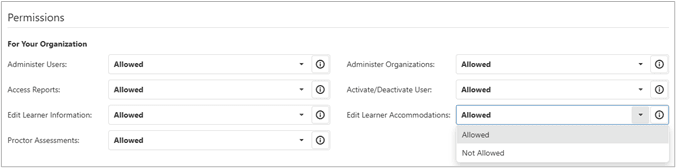
User permission configuration has been consolidated and organized in a more user friendly interface. In addition, user permissions can now be configured in bulk.
Each available permission defaults to Allowed. To change permission, from the dropdown select Not Allowed. Each permission has an information button that provides an explanation of the permission that would be granted.
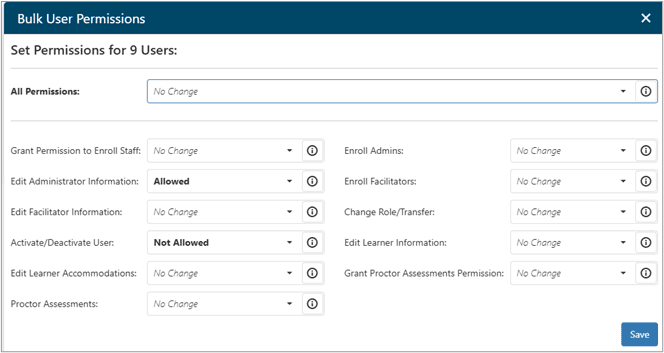
To bulk configure permissions, search for the users you would like to edit, select all, and select the Edit Permissions bulk icon  at the top of the grid. This will open a Bulk User Permissions dialog box where selections can be made per permission or for all permissions at once.
No Change means that whatever that permission is currently set at for the selected users will stay the same.
- Allowed means you are changing that permission to allow the selected users the ability.
- Not Allowed means you are changing that permission to not allow the selected users the ability.
Reports Updates
Reports have been updated with improved layouts, filtering, and access to data, as well as performance updates.
The Individual Report now displays a dialogue box with potential users rather than listing them at the bottom of the screen.
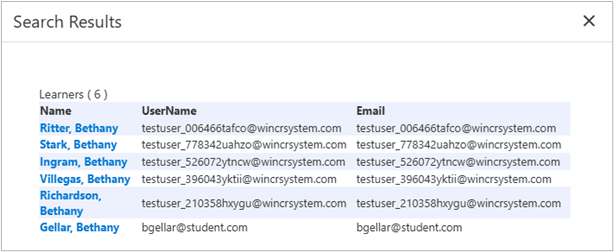
The Individual, mySC Individual, MWR Individual, and Objective Based Individual Reports are all updated to include a filter for any custom field that is configured as searchable and unique so that users can search by unique ID.
Test Tickets
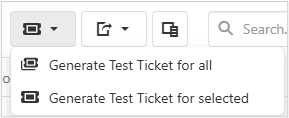
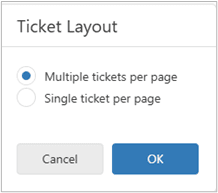
When generating test tickets, there is now the option to generate multiple tickets per page or a single ticket per page.
First Select from the test ticket drop down generate all or generate selected tickets. Then a pop up dialogue box will display with the option to generate multiple or single tickets per page.
Other
Ability to search by partial string in User Administration search fields.
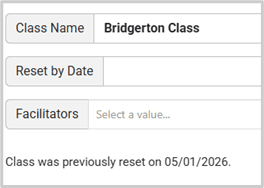
The date a class was previously reset via Reset by Date is now displayed in Class Management.
Overall performance and security improvements have been made.
Miscellaneous Bug Fixes
- Fixed an issue that was preventing the ability to export the Assessment Invoice Report results.
- Fixed an issue that prevented organizations from being selected in Create User immediately after performing a transfer.
- Added the missing arrow icon back to the expand/collapse blue bar that separates the filter panel from results in Reports.
- Improved messaging when a large transfer process is taking time.
- Fixed an issue that caused the "Learner Can View Only" setting to not be obeyed for date custom fields, like DOB.
- Fixed an issue that impacted the ability to use the general search bar above the Class Assignment Learner Pool grid.

- Fixed an issue with Academic Skills Courseware Certificate counts not displaying correctly on the administrator dashboard when a user initially earned a certificate through the placement test and then earned a higher level through the posttest.
- Fixed an issue where Work Ready Courseware lessons were not tracking correctly on Assignments.
- The Unique Identifier field is not working as expected on the myStrategic Compass Learner Listing report. This will be addressed in a future release.
For more information or support, contact Support at WIN Learning
To report issues or ask questions about this release, please contact the WIN Learning Help Desk:
Email: support@winlearning.com
Phone: 888-717-9461 Option 3
All internal and external support requests are logged and tracked and get routed to the appropriate parties.
Please remember to include a detailed description of the issue, who it impacts, system/environment info, and reproduction steps and an actual due date. If helpful, please include a screenshot.
