
WIN Learning Career Readiness System Release Updates: July 2026
Version 6.11.0 Released 7/21/2026
Summary
Version 6.11.0 of WIN Career Readiness System code was released to production on July 21, 2026. Highlights of the release include:
Report Updates
Miscellaneous Enhancements
Bug Fixes
Report Updates
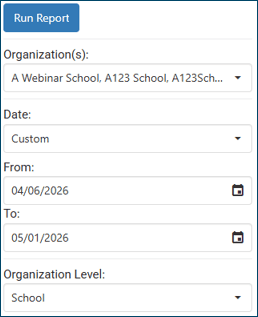
Date range has been added to the Learner Credential Summary Report to allow users to prefilter the report and improve response time and results.
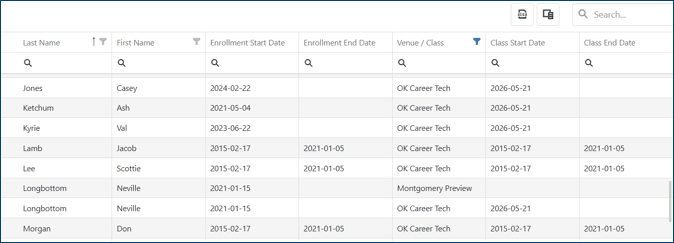
The Enrollment Report has been enhanced to include Venue/Class enrollment information. If a learner is enrolled in multiple classes, each will be listed on a separate row.
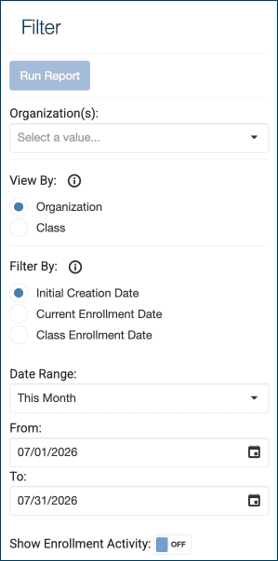
The Enrollment Report has been enhanced to allow users to view the report organized by organization or organized by class. This will allow an administrator to export an entire school’s class rosters via the report.
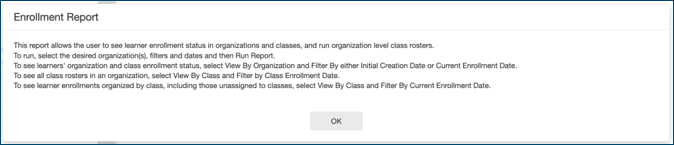
Information buttons have been added to help explain how to run the Enrollment Report for different purposes, and how to configure the filters.


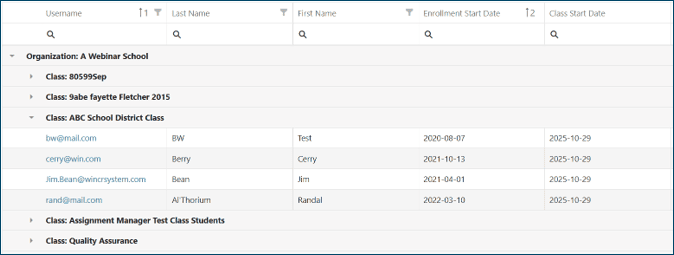
Columns are configurable. Default columns can be hidden (e.g. username, email) and additional available columns can be added via the Column Chooser (e.g. unique identifier). Columns can be rearranged by dragging into alternate positions.
The Individual Report allows the user to search by custom unique identifier.
Miscellaneous Enhancements
Assessment Updates
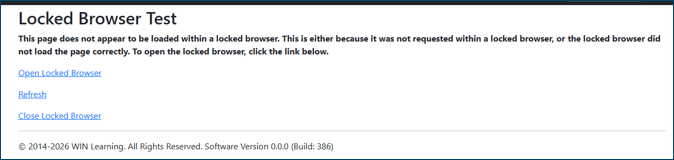
The Open Locked Browser link now appears as a hyperlink, making it clearer that it is a clickable link.
The Submit button label has been changed to Submit Test, making it clearer what the button does.

System username and password will be hidden in Class Roster for clients using test tickets. After the test window closes and test tickets expire, system usernames and passwords will be available in the Column Chooser if needed.
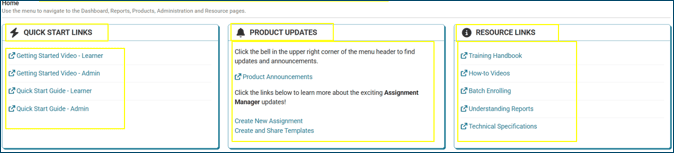
The Home screen is customizable per portal client. Text and resource links can be updated for client-specific needs. To discuss the possibility of customizing your home screen, please reach out to your Customer Success Manager.
In Class Management, Reset by Date means that on this date, all learners in the class will be removed from the class roster so a new set of learners can be enrolled. A class that has been Reset can be restored by selecting Undo next the reset confirmation message.


Bug Fixes
Fixed an issue where the graphs on the Admin Dashboard didn’t display correctly when the date was set to Today
Fixed an issue where some Accredible emails were failing to update when a User changed their email address
Fixed an issue where apostrophes in email addresses caused certain validation failures
Fixed an issue where the “Last Active” column in Class Management displayed the incorrect date when the User hasn’t logged in
Fixed an issue where some Users were unable to change passwords when certain custom fields were set to read-only
Fixed performance issues that caused Class Management to load slowly
For more information or support, contact Support at WIN Learning
To report issues or ask questions about this release, please contact the WIN Learning Help Desk:
Email: support@winlearning.com
Phone: 888-717-9461 Option 3
All internal and external support requests are logged and tracked and get routed to the appropriate parties.
Please remember to include a detailed description of the issue, who it impacts, system/environment info, and reproduction steps and an actual due date. If helpful, please include a screenshot.
